
Best Wireless Mechanical Keyboards (2026): 6 Proven Picks for Work and Play
Six wireless mechanical keyboards compared by layout, switches, sound and battery, from budget hot-swap boards to a quiet low-profile office pick.
We earn a commission if you buy through our links, at no extra cost to you. As an Amazon Associate, we earn from qualifying purchases. How we make money.

The best wireless mechanical keyboards now give you the feel and sound of a custom board without a cable tying you to one computer. Most of the models below connect over Bluetooth, a 2.4GHz receiver or USB-C, and several let you swap switches without soldering.
The hard part is choosing between quiet office boards, creamy-sounding enthusiast boards and budget gaming boards that all look similar in listings. We compared specs, listings and owner feedback to pick six that cover the main layouts and budgets, and we call out who should skip each one.
The best wireless mechanical keyboard for most people is the AULA F75 Pro because it combines a compact 75% layout, tri-mode wireless, a 4000mAh battery and hot-swap switches at a mid-range price. If you want a quiet, low-profile board for office work, get the Logitech MX Mechanical. On a tight budget, the Redragon K671KS covers the basics.
Best Wireless Mechanical Keyboards at a Glance

- 75% layout with a control knob
- Tri-mode wireless with 4000mAh battery
- Hot-swap 3-pin and 5-pin switches
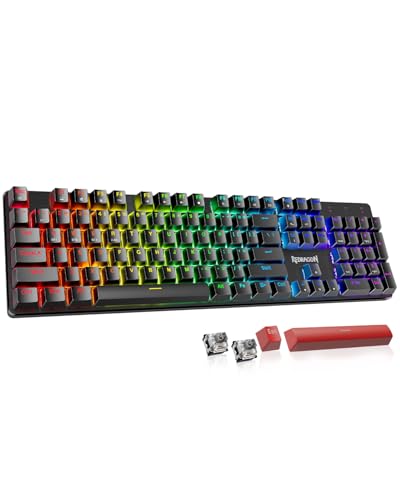
- Tri-mode with up to 5 devices
- Hot-swappable with spare switches
- Double injection PBT keycaps

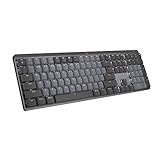
- Low-profile Tactile Quiet switches
- Pairs with 3 devices
- Smart backlight and up to 15 day battery
| Product | Price | ||
|---|---|---|---|
 | Best Overall AULA F75 Pro | $68.99 | Check Price |
 | Best Budget Redragon K671KS | $32.99 | Check Price |
 | Premium Pick Logitech MX Mechanical | $179.99Price as of Nov 3, 2026 2:14 pm EST ⓘ | Check Price |
 | Best with Number Pad AULA F99 | $68.99Price as of Nov 3, 2026 2:14 pm EST ⓘ | Check Price |
 | Best for Creamy Sound Kisnt KN85 | $49.99Price as of Nov 3, 2026 2:14 pm EST ⓘ | Check Price |
 | Best Full-Size Budget Redragon K689 PRO | $49.99 | Check Price |
1. AULA F75 Pro: Best Overall
AULA F75 Pro
A compact enthusiast board with a knob and a big battery
- Layout: 75%, 81 keys
- Connection: Bluetooth 5.0, 2.4GHz, USB-C
- Battery: 4000mAh
- Switches: Pre-lubed LEOBOG Reaper, hot-swap 3 or 5 pin
- Keycaps: Side-printed PBT
Pros
- Connects up to five devices
- Multi-function knob for media and lighting
- Five layers of sound dampening
Cons
- Gaming-style RGB will not suit every office
- Macro software is a separate download
The F75 Pro packs the features enthusiasts look for into a mid-range board, which is why it leads our list of the best wireless mechanical keyboards. It is a hot-swappable keyboard that accepts 3-pin and 5-pin switches, so you can try different switch types later without soldering. Out of the box it ships with pre-lubed LEOBOG Reaper switches and pre-lubricated stabilizers, which the listing says give a smooth, creamy sound.
Inside, AULA lists an extended silicone pad, PCB single key slotting and five layers of filling to cut hollow case noise. The 81-key 75% keyboard layout keeps the arrow keys and function row while saving desk space for your mouse. A multi-function knob handles volume and lighting, and you can connect up to five devices over Bluetooth 5.0, 2.4GHz wireless or a USB-C cable.
The tradeoff is style. It is marketed as a gaming keyboard, with 16.8 million color RGB and music rhythm effects, though you can switch to a single color or turn the backlight off. If you need a number pad every day, look at the AULA F99 instead.
2. Redragon K671KS: Best Budget Wireless Mechanical Keyboard
Redragon K671KS
Tri-mode and hot-swap at an entry-level price
- Connection: USB-C, Bluetooth, 2.4GHz
- Devices: Up to 5
- Switches: Red, hot-swappable
- Keycaps: Double injection PBT
- Extras: 8 spare switches, metal panel
Pros
- Physical mode switch on the back
- Includes spare switches and keycaps
- Per-key RGB and macro editing
Cons
- No battery capacity listed
- Gaming look may not suit a work desk
If you want to try a mechanical board without spending much, the K671KS is a smart place to start. It is the least expensive of the best wireless mechanical keyboards we picked that still offers hot-swap switches. It connects over USB-C, Bluetooth or 2.4GHz wireless with up to five devices, and a physical switch on the back changes modes. Redragon lists it as compatible with PC, tablet and Mac.
It is also a hot-swappable keyboard, and the box includes eight spare switches and two red keycaps, which is generous at this price. Double injection PBT keycaps, a metal top panel and macro editing with per-key RGB round it out. Redragon says the keys are rated for 500,000 presses in testing.
Skip it if battery life is a priority, because the listing does not state a battery capacity. The stock red switches are also a fairly basic starting point, so plan to upgrade them if you care about sound.
3. Logitech MX Mechanical: Best for Office Work
Logitech MX Mechanical
A quiet, low-profile full-size board built for productivity
- Layout: Low-profile full-size
- Switches: Tactile Quiet
- Connection: Bluetooth Low Energy, Logi Bolt receiver
- Devices: Up to 3
- Battery: Up to 15 days, USB-C rechargeable
Pros
- Quiet tactile switches suit shared spaces
- Smart backlight adjusts to the room
- Logi Options+ and Flow multi-computer control
Cons
- Not hot-swappable
- Pairs with fewer devices than the tri-mode boards
Most of the best wireless mechanical keyboards are aimed at gamers. The MX Mechanical is different: it is the board we would give someone who types all day in an office or a shared home. Its Tactile Quiet switches give you a bump you can feel with less noise, so your typing does not disturb people around you. Low-profile keys in a full-size layout also feel closer to a laptop keyboard than a tall gaming board.
Smart illumination lights the keys as your hands approach and adjusts to the room’s lighting. You can pair it with up to three devices through Bluetooth Low Energy or the included Logi Bolt receiver, and Logi Options+ lets you customize Fn keys and use Flow to move between computers. Logitech rates the USB-C rechargeable battery for up to 15 days. More details are on Logitech’s website.
Who should skip it? Anyone who wants to mod their keyboard. It is not a hot-swappable keyboard, and it does not aim for the deep, creamy sound of gasket-mounted boards. It is also the priciest pick here.
4. AULA F99: Best with a Number Pad

AULA F99
A 96% board that keeps the numpad without the full-size footprint
- Layout: 96%, 99 keys
- Connection: Bluetooth 5.0, 2.4GHz, USB-C
- Battery: 8000mAh
- Switches: Pre-lubed linear, hot-swap 3 or 5 pin
- Keycaps: Double-shot PBT
Pros
- Largest battery capacity in this guide
- Gasket structure with sound dampening
- Keycap and switch pullers included
Cons
- Bigger than a 75% board
- Gaming-focused styling
The F99 is a smart pick if you enter numbers every day but do not want a giant full-size board. Its 96% layout squeezes 99 keys, including the number pad and arrows, into a tighter footprint. It also has the biggest battery here, an 8000mAh cell, according to the listing.
AULA uses a gasket structure with an extended silicone pad and five layers of filling, along with pre-lubed linear switches and double-shot PBT keycaps. Like the F75 Pro, it connects up to five devices over three modes, and the hot-swap PCB takes 3-pin and 5-pin switches. Switch and keycap pullers come in the box.
If you never touch the number pad, a 75% keyboard frees more room for your mouse. The F99 is also not a low-profile design, so some typists may want a wrist rest.
5. Kisnt KN85: Best for Creamy Sound

Kisnt KN85
A retro-styled gasket board tuned for a soft, thocky sound
- Layout: 75%, 85 keys
- Connection: USB-C, 2.4GHz, Bluetooth 5.0 (3 channels)
- Battery: 4000mAh
- Switches: Pre-lubed Bsun linear, 45-50gf
- Size: 13.68 x 5.51 x 1.77 in
Pros
- Gasket mount for a cushioned feel
- Listed low latency in wired and 2.4GHz modes
- Works across Windows and Mac
Cons
- Driver software is Windows only
- Bluetooth limited to 3 channels
Among the best wireless mechanical keyboards for typists, the KN85 stands out because it is built around sound. Its gasket mount absorbs harsh vibrations to produce what Kisnt calls a smooth, marbly thock rather than a loud clack. The pre-lubed Bsun linear switches have a 45 to 50gf actuation force, which feels light and buttery for long writing sessions.
It is another 75% keyboard, this time with 85 keys, and the listing gives its size as 13.68 by 5.51 by 1.77 inches. It connects via USB-C, 2.4GHz or Bluetooth 5.0 with three channels, and Kisnt lists latency of 2ms wired, 5ms on 2.4GHz and 11ms on Bluetooth. A 4000mAh battery powers it, and you can keep typing in wired mode while it charges.
The main limitation is software. The KN85 driver for remapping keys and macros runs on Windows only and works in wired or 2.4GHz mode. Mac users can still type and adjust lighting with shortcut keys.
6. Redragon K689 PRO: Best Full-Size Budget Board

Redragon K689 PRO
A full 108-key gasket board with extra shortcut keys
- Layout: Full-size, 108 keys
- Connection: USB-C, Bluetooth, 2.4GHz
- Hotkeys: 4 dedicated, remappable
- Build: Gasket mount, 3-layer dampening
- Keycaps: Round PBT
Pros
- Dedicated mute, calculator, lock and desktop keys
- Accepts most 3-pin and 5-pin switches
- Fade-resistant PBT keycaps
Cons
- Full-size takes a lot of desk space
- No battery capacity listed
If you want every key, including a full number pad, the K689 PRO gives you 108 keys plus four hotkeys that default to mute, calculator, screen lock and desktop. You can reassign them in Redragon’s PRO software, along with lighting and macros.
It uses a gasket-mounted build with three layers of noise dampening for a cushioned feel, and it is a hot-swappable keyboard that accepts almost any 3-pin or 5-pin switch. Round PBT keycaps resist the shine that ABS keycaps develop over time. Tri-mode wireless lets you move between PC, laptop and tablet.
Skip it if your desk is small, since a full-size board pushes your mouse farther out. Like the K671KS, the listing does not give a battery capacity.
How to Choose the Best Wireless Mechanical Keyboards for You
Listings for the best wireless mechanical keyboards tend to repeat the same buzzwords. These are the specs that actually change how a board feels and fits into your day.
Layout and size
A 75% keyboard keeps the function row and arrows but drops the number pad, which leaves more room for your mouse and keeps your shoulders narrower. A 96% board like the F99 keeps the numpad in a tighter shape. Full-size boards give you everything but take the most space.
Connection modes
Tri-mode boards offer Bluetooth, a 2.4GHz receiver and a USB-C cable. Bluetooth is handy for tablets and laptops with few ports, while 2.4GHz usually has lower latency for gaming. The Bluetooth SIG maintains the standard if you want the technical background. If you dock a laptop, our guide to the best USB-C hubs for MacBook helps free up a port for the receiver.
Switch type
Linear switches move smoothly with no bump and suit fast typing and gaming. Tactile switches, like Logitech’s Tactile Quiet, add a bump you feel at the actuation point. If you are unsure, a hot-swappable keyboard lets you change your mind later without buying a new board.
Sound and build
Gasket mounts, silicone pads and foam layers soften the sound into the deeper thock many people like. Boards without that damping can sound hollow or clacky. If you share a room or take calls, quieter switches matter more than the sound profile.
Battery and lighting
Bigger batteries, like the 8000mAh cell in the F99, go longer between charges. RGB lighting drains batteries faster, so turning it down or off stretches runtime on any wireless board.
Software and Mac support
Check whether the remapping software runs on your computer. Logitech’s Options+ supports both Windows and Mac, while some budget drivers are Windows only. You can usually still type and change lighting without the software.
Keyboard Layouts Compared
| Layout | Example | Number pad | Good for |
|---|---|---|---|
| 75% | AULA F75 Pro, Kisnt KN85 | No | Small desks, gaming, writing |
| 96% | AULA F99 | Yes | Data entry in less space |
| Full-size | Logitech MX Mechanical, Redragon K689 PRO | Yes | Office work, heavy number entry |
Layout is the first filter when you shop the best wireless mechanical keyboards, and most people who switch to a 75% keyboard do not miss the number pad. If you are not sure, think about how often you type long strings of numbers. Pair your board with one of the best ergonomic mice and the narrower layout lets the mouse sit closer to your body.
Connection Modes: 2.4GHz, Bluetooth and Wired
Many of the best wireless mechanical keyboards offer three ways to connect, and each one has a job. Knowing which to use keeps typing smooth and the battery lasting longer.
2.4GHz dongle for gaming
The USB receiver usually gives the most stable, lowest-latency wireless link, which is why gamers prefer it. Plug it into a front USB port or an extension cable close to the keyboard, rather than a rear port behind a metal case.
Bluetooth for multiple devices
On the best wireless mechanical keyboards, Bluetooth is the easy way to switch between a laptop, tablet and phone. It typically uses less power than the dongle, but it can add a little delay that is fine for typing and less ideal for fast games.
Wired for charging and updates
Plug in with the USB-C cable to charge, to update firmware, and for the lowest latency possible. Wired mode is also the fix if the wireless link ever acts up. If you swap switches on a hot-swappable keyboard, unplug it and turn it off first.
Mac users: check the key mapping
Many keyboards include a Windows and Mac mode, often switched with a key combination or a toggle. Set it once on any of the best wireless mechanical keyboards so the Command and Option keys land where you expect them. This matters on a compact 75% keyboard, where there are fewer spare keys to remap.
Frequently Asked Questions
What are the best wireless mechanical keyboards for Mac?
The Logitech MX Mechanical is the most Mac-friendly pick here, with Options+ software and multi-OS support. The Redragon K671KS lists Mac compatibility too, and the Kisnt KN85 works with Mac, although its driver is Windows only.
What does hot-swappable mean?
A hot-swappable keyboard has sockets that let you pull switches out and push new ones in without soldering. Check whether it supports 3-pin or 5-pin switches before you buy replacements.
Is a wireless mechanical keyboard good for gaming?
Yes, especially in 2.4GHz or wired mode. Kisnt, for example, lists 5ms latency on 2.4GHz versus 11ms on Bluetooth. Use the receiver or cable for competitive games.
Which keyboard here is the quietest?
The Logitech MX Mechanical with Tactile Quiet switches is designed for less noise. Gasket boards like the Kisnt KN85 sound softer than typical gaming boards but are not silent.
The bottom line
Of the best wireless mechanical keyboards in this guide, the AULA F75 Pro is the one most people should buy. It brings a 75% layout, tri-mode wireless, a 4000mAh battery and hot-swap switches together without a premium price. Choose the Logitech MX Mechanical for quiet office work, and the Redragon K671KS if you want the lowest-cost way in.
Check AULA F75 Pro price

