
The Best Monitors for MacBook Pro and MacBook Air (2026)
Text on a 1440p screen looks soft next to a MacBook’s display. These 4K and 5K monitors keep macOS sharp, and most charge your laptop over one USB-C cable.
We earn a commission if you buy through our links, at no extra cost to you. As an Amazon Associate, we earn from qualifying purchases. How we make money.
Plug a MacBook into a cheap 1440p monitor and you’ll notice it straight away: text looks a little fuzzy compared with the laptop’s own screen. macOS is designed for high pixel density, so a 27-inch 4K or 5K display is the real sweet spot.
The other thing to look for is USB-C with power delivery. One cable then carries video, data and charging, and your desk stays clean.
Quick picks

- 4K at up to 120Hz
- USB-C with 65W charging
- 99% sRGB IPS panel

- Factory calibrated, Delta E under 2
- 99% DCI-P3 and Adobe RGB
- 96W USB-C charging
- 27-inch 5K Retina
- Thunderbolt 5 ports
- 12MP Center Stage camera
Compare prices
| Product | Price | ||
|---|---|---|---|
| Best Overall Dell 27 Monitor S2725QC | $349.97Price as of Nov 3, 2026 11:01 am EST ⓘ | Check Price |
| Best for Photo Editing ASUS ProArt PA279CRV | $419.71Price as of Nov 3, 2026 11:01 am EST ⓘ | Check Price |
| Premium Pick Apple Studio Display | $1,549.99Price as of Nov 3, 2026 11:05 am EST ⓘ | Check Price |
 | Budget 4K LG 27UP850K-W UltraFine 4K | $349.99Price as of Nov 3, 2026 11:05 am EST ⓘ | Check Price |

Dell 27 Monitor S2725QC
A sharp, smooth 4K screen at a fair price
- Size: 27-inch, 3840 x 2160
- Refresh rate: Up to 120Hz
- Panel: IPS, 99% sRGB
- USB-C: Up to 65W charging
- Pixel density: 163 PPI
Pros
- 120Hz makes scrolling feel smooth
- One-cable setup with USB-C
- Built-in speakers are better than usual
Cons
- 65W may not keep a 16-inch MacBook Pro full under heavy load
- sRGB rather than wide P3 color
Most 4K monitors run at 60Hz. The S2725QC goes up to 120Hz, which you notice every time you scroll a web page or move a window. Text is crisp at 163 pixels per inch, and USB-C carries video plus up to 65W of charging.
That 65W is enough for MacBook Air and the 14-inch MacBook Pro in everyday use. If you push a 16-inch Pro hard, the battery may slowly drain while plugged in.

ASUS ProArt PA279CRV
Accurate color straight out of the box
- Size: 27-inch 4K IPS
- Color: 99% DCI-P3, 99% Adobe RGB
- Accuracy: Calman Verified, Delta E under 2
- USB-C: 96W charging
- Extras: Daisy chain, height adjust
Pros
- Factory calibrated for color work
- 96W covers every MacBook
- Fully adjustable stand
Cons
- 60Hz only
- Overkill for office work
If you edit photos or video, color accuracy matters more than refresh rate. The ProArt PA279CRV is calibrated at the factory to a Delta E under 2 and covers 99% of both DCI-P3 and Adobe RGB, so what you see is close to what you’ll print or publish.

LG 27UP850K-W UltraFine 4K
Wide color and 90W charging for less
- Size: 27-inch 4K IPS
- Color: 95% DCI-P3 (typ.)
- HDR: VESA DisplayHDR 400
- USB-C: Up to 90W
- Ports: DP, 2x HDMI, 2x USB
Pros
- 90W USB-C is plenty for most MacBooks
- Wide P3 color
- Height, tilt and pivot stand
Cons
- 60Hz
- HDR400 is entry-level HDR
The LG covers most of what Mac owners want: 4K, wide P3 color, and 90W charging over USB-C, usually for less than the Dell. It’s limited to 60Hz, which is fine for work but less smooth.
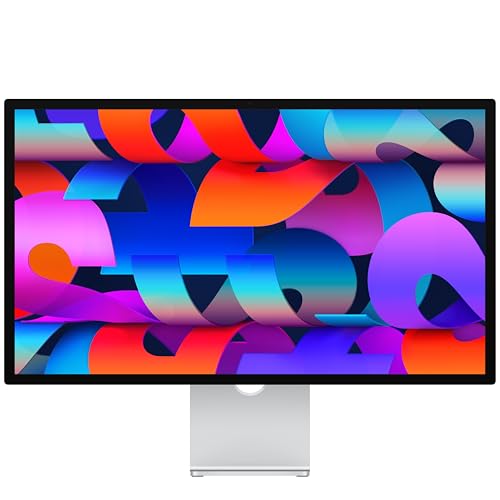
Apple Studio Display
The one that matches your MacBook perfectly
- Size: 27-inch 5K Retina
- Brightness: 600 nits
- Ports: 2x Thunderbolt 5, 2x USB-C
- Camera: 12MP Center Stage, Desk View
- Audio: Six speakers, Spatial Audio
Pros
- 5K looks exactly as sharp as a MacBook screen
- Excellent camera, mics and speakers
- Thunderbolt 5 and laptop fast charging
Cons
- Very expensive
- Few picture settings outside macOS
The Studio Display is expensive, but nothing else feels as native on a Mac. At 5K, macOS renders at the same sharpness as your MacBook’s built-in screen. The camera, microphones and six speakers also mean you can skip a separate webcam and speakers.
Things Mac owners should check
- External display limits. Some MacBook Air models support only one external display. Check Apple’s tech specs for your model before buying two monitors.
- Charging wattage. 65W is fine for Air and 14-inch Pro. Look for 90W+ for a 16-inch Pro.
- Scaling. On 4K at 27 inches, the “looks like 2560 x 1440” setting gives a good balance of size and sharpness.
Need more ports for your setup? See the best USB-C hubs for MacBook.
The bottom line
The Dell S2725QC is the best mix of sharpness, smoothness and price. Creative pros should get the ASUS ProArt PA279CRV, and if budget isn’t a concern, the Studio Display is the most Mac-like screen you can buy.
Check Dell S2725QC price