
Best Streaming Devices (2026): 5 Smart Picks for 4K and HD TVs
Five Roku and Fire TV sticks compared on 4K, Dolby Vision, Wi-Fi, remotes and cloud gaming, with a pick for older HD TVs too.
We earn a commission if you buy through our links, at no extra cost to you. As an Amazon Associate, we earn from qualifying purchases. How we make money.

The best streaming devices can make an older TV feel new, giving it a fresh set of apps and a quicker way to find something to watch. A small stick behind the screen gives you Netflix, Prime Video, YouTube, free live channels and a voice remote in one place.
We compared specs, listings and owner feedback for the Roku and Amazon Fire TV sticks on sale now and picked the five best streaming devices for different TVs and budgets. The right one depends on your TV (4K or HD), your Wi-Fi, and which you prefer: Roku’s simple home screen or Amazon’s Alexa-driven Fire TV.
The best streaming device for most people is the Roku Streaming Stick 4K because it supports 4K with Dolby Vision and HDR10+, has a long-range Wi-Fi receiver, and keeps the interface simple. If you want 4K for less, get the Amazon Fire TV Stick 4K.
Best Streaming Devices at a Glance
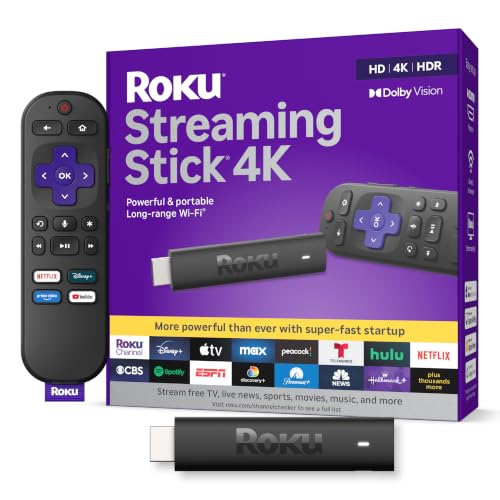
- 4K with Dolby Vision and HDR10+
- Long-range Wi-Fi receiver
- Simple Roku home screen
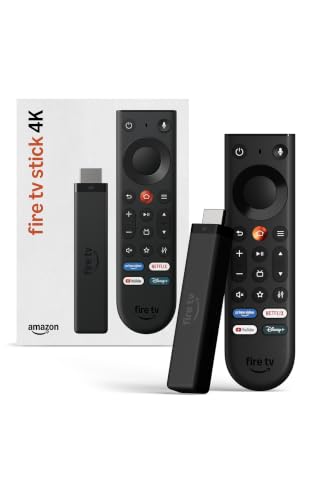
- 4K with HDR10+
- Wi-Fi 6 support
- Powered by the TV, no wall adapter

- Wi-Fi 6E support
- Dolby Vision, HDR10+ and Dolby Atmos
- Powerful processor for fast app starts
| Product | Price | ||
|---|---|---|---|
 | Best Overall Roku Streaming Stick 4K | $48.00 | Check Price |
 | Best Budget Fire TV Stick 4K | $24.99 | Check Price |
 | Premium Pick Fire TV Stick 4K Max | $84.99Price as of Nov 3, 2026 2:18 pm EST ⓘ | Check Price |
 | Best for Cloud Gaming Fire TV Stick 4K Plus | $39.99 | Check Price |
 | Best for HD TVs Roku Streaming Stick HD | $24.00 | Check Price |
1. Roku Streaming Stick 4K: Best Overall
Roku Streaming Stick 4K
4K, Dolby Vision and long-range Wi-Fi in a tiny stick
- Resolution: 4K
- HDR: Dolby Vision and HDR10+
- Wi-Fi: Long-range receiver
- Remote: Roku Voice Remote
- Extras: Free and live local news and sports
Pros
- Supports both Dolby Vision and HDR10+
- Long-range Wi-Fi helps in rooms far from the router
- Compact design will not block other HDMI ports
Cons
- No Wi-Fi 6 mentioned in the listing
- No cloud gaming features listed
Of the best streaming devices we compared, the Roku Streaming Stick 4K is the easiest recommendation for most living rooms. It streams in 4K and supports both Dolby Vision and HDR10+, so it can take advantage of whichever HDR format your TV handles best.
The long-range Wi-Fi receiver is the practical highlight. If your TV sits in a bedroom or basement far from the router, this stick is designed to hold a steadier connection. The slim body tucks behind the TV and will not block neighboring HDMI ports. You also get free and live TV, including local news and sports, and you can take it with you when traveling to watch your own account on another TV.
Roku keeps its interface simple and easy to find your way around. The tradeoff is that the listing does not mention Wi-Fi 6 or cloud gaming. If those matter, the Fire TV Stick 4K Plus or 4K Max are better fits.
2. Amazon Fire TV Stick 4K: Best Budget
Amazon Fire TV Stick 4K
Affordable 4K with Wi-Fi 6 and a redesigned remote
- Resolution: 4K
- HDR: HDR10+
- Wi-Fi: Wi-Fi 6
- Power: Direct Power from the TV
- Remote: New Fire TV Remote
Pros
- Wi-Fi 6 at a budget price
- No wall adapter needed with Direct Power
- Remote has TV power, volume and Live TV buttons
Cons
- Dolby Vision not listed
- Interface leans on Amazon services and Alexa+
The newest Fire TV Stick 4K is the budget 4K streaming stick to beat. It streams in 4K with HDR10+, supports Wi-Fi 6, and uses Direct Power to run from your TV’s HDMI port with no wall adapter needed. That means one less cord behind the screen.
The new Fire TV Remote is a real upgrade. It has TV power and volume controls, a navigation ring for searching and jumping to scenes, and dedicated buttons for the Shortcut Panel, Fire TV menu and Live TV. The voice remote also works with Alexa+ for search and smart home control, and you can turn your TV into an art display when idle.
The listing mentions HDR10+ but not Dolby Vision, so if your TV relies on Dolby Vision, the Roku 4K or Fire TV Stick 4K Max are the better picks. The Fire TV interface also leans heavily on Amazon content and Alexa+. Skip it if you prefer a more neutral home screen.
3. Amazon Fire TV Stick 4K Max: Best Premium Stick
Fire TV Stick 4K Max
Wi-Fi 6E, Dolby Vision and Dolby Atmos for the best picture and sound
- Resolution: 4K Ultra HD
- HDR: Dolby Vision and HDR10+
- Audio: Dolby Atmos
- Wi-Fi: Wi-Fi 6E
- Extras: Ambient Experience with 2,000+ artworks
Pros
- Wi-Fi 6E support for less crowded networks
- Powerful processor for fast app starts
- Dolby Vision, HDR10+ and Dolby Atmos
Cons
- Wi-Fi 6E only helps with a 6E router
- Costs more than other sticks here
The Fire TV Stick 4K Max is the top-end stick among the best streaming devices in this guide. It supports 4K Ultra HD with Dolby Vision, HDR10+ and Dolby Atmos audio, so it covers the major premium formats. If you have a high-end TV and a soundbar, this is the one that makes the most of them.
Amazon lists a powerful processor for fast app starts and smooth navigation, and Wi-Fi 6E support for less crowded wireless connections. The Fire TV Ambient Experience can display over 2,000 artworks and photos when you are not watching. Alexa+ and AI-powered search help you find shows across apps.
Wi-Fi 6E only helps if your router supports it. Our Wi-Fi 6 vs. 6E vs. 7 explainer breaks down the differences. Skip the Max if your TV is not 4K or does not support Dolby Vision, because you would be paying for features you cannot use.
4. Amazon Fire TV Stick 4K Plus: Best for Cloud Gaming
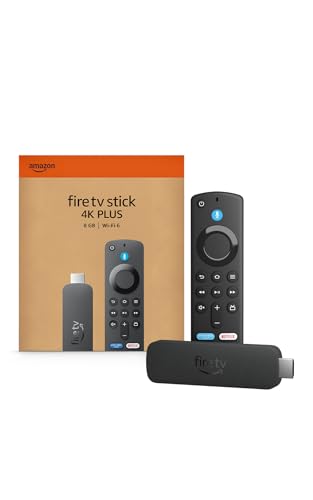
Fire TV Stick 4K Plus
A 4K stick that doubles as a cloud gaming box
- Resolution: 4K
- Wi-Fi: Wi-Fi 6
- Gaming: Xbox Game Pass and Luna cloud gaming
- Voice: Alexa+
- Search: AI-powered Fire TV Search
Pros
- Cloud gaming without a console
- Wi-Fi 6 for smoother 4K with many devices online
- Improved performance over the previous 4K stick
Cons
- Game Pass subscription and controller sold separately
- Listing does not detail HDR formats
The Fire TV Stick 4K Plus adds something the others do not highlight: cloud gaming. With Xbox Game Pass and Luna, you can stream hundreds of games to your TV without a console. You will need a Game Pass subscription and a compatible controller, both sold separately.
For regular streaming, it offers 4K with improved performance over the previous generation, Wi-Fi 6 support for smoother playback when other devices share the router, and Alexa+ voice search. Cloud gaming is sensitive to network quality, so a strong connection matters. Our best mesh Wi-Fi systems guide can help if your TV sits far from the router.
The listing does not spell out which HDR formats it supports. If Dolby Vision is a priority, the 4K Max is the clearer choice. Skip the Plus if you have no interest in games, since the cheaper Fire TV Stick 4K covers the basics.
5. Roku Streaming Stick HD: Best for HD TVs

Roku Streaming Stick HD
Simple HD streaming for bedrooms, kitchens and older TVs
- Resolution: HD
- Wi-Fi: Long-range
- Power: Powers from the TV
- Remote: Roku Voice Remote with TV power and volume
- Extras: Free and live local news and sports
Pros
- Powers from the TV, no wall outlet needed
- Long-range Wi-Fi
- Remote controls TV power and volume
Cons
- HD only, no 4K
- Wasted on a 4K TV
Not every TV needs 4K. If you have an older HD set in a bedroom, kitchen or guest room, the Roku Streaming Stick HD is the sensible choice. It gives you Roku’s simple home screen, free and live TV, and a voice remote that also controls the TV’s power and volume.
It powers from the TV alone, so there is no wall outlet or extra cord, and it has long-range Wi-Fi for rooms farther from the router. Setup takes minutes, and you can take it on trips to stream your own account on hotel or rental TVs.
The limit is obvious: it streams in HD, not 4K. If there is any chance you will move it to a 4K TV, spend a little more on a 4K streaming stick, such as the Roku 4K or Fire TV Stick 4K.
How to Choose the Best Streaming Device
The best streaming devices look almost identical, so the choice comes down to a few key specs and your existing gear.
Match your TV’s resolution
If your TV is 4K, buy a 4K streaming stick. If it is HD, the Roku Streaming Stick HD saves money with no loss in picture. Check your TV’s model number if you are unsure.
HDR formats: Dolby Vision vs. HDR10+
HDR improves contrast and color. Dolby Vision and HDR10+ are the two dynamic HDR formats, and TVs support one, the other, or both. The Roku 4K and Fire TV Stick 4K Max support both. Learn more about Dolby Vision on the Dolby website.
Wi-Fi standard
Wi-Fi 6 or 6E help when many devices share your network. The Fire TV Stick 4K and 4K Plus list Wi-Fi 6, and the 4K Max lists Wi-Fi 6E. Roku’s 4K and HD sticks advertise a long-range receiver instead.
Roku vs. Fire TV interface
Roku offers a simple, uncluttered home screen. Fire TV centers on Alexa+ and Amazon recommendations, with smart home control built in. If you already use Alexa devices, Fire TV fits naturally.
Remote features
All five include a voice remote, so you can search by speaking instead of typing with arrow keys. The Roku HD’s remote and the new Fire TV Remote control TV power and volume, so you may be able to put your TV remote in a drawer.
Power and placement
Some sticks draw power straight from the TV. The Fire TV Stick 4K uses Direct Power, and the Roku HD powers from the TV alone, which keeps cables tidy.
Feature Comparison at a Glance
Here is how the five sticks line up on the specs most buyers care about, based on their listings.
| Device | Resolution | HDR | Wi-Fi | Standout |
|---|---|---|---|---|
| Roku Streaming Stick 4K | 4K | Dolby Vision, HDR10+ | Long-range | Simple interface |
| Fire TV Stick 4K | 4K | HDR10+ | Wi-Fi 6 | New remote, Direct Power |
| Fire TV Stick 4K Max | 4K Ultra HD | Dolby Vision, HDR10+ | Wi-Fi 6E | Dolby Atmos, powerful processor |
| Fire TV Stick 4K Plus | 4K | Not listed | Wi-Fi 6 | Cloud gaming |
| Roku Streaming Stick HD | HD | Not applicable | Long-range | Powers from the TV |
Want a big screen anywhere? A stick also pairs well with a projector. See our best portable projectors guide for options that accept HDMI streaming sticks.
Setup Tips for a Smoother Stream
Even the best streaming devices can stutter if they are set up poorly. These quick fixes solve most problems.
- Use the 5GHz or 6GHz band if you can. Faster bands help 4K streams, and the Fire TV sticks list Wi-Fi 6 or 6E support.
- Move the router or add a mesh node. A 4k streaming stick hidden behind a TV can lose signal. Roku’s long-range Wi-Fi receiver helps, but distance still matters.
- Pick the right HDMI port. Some TVs only support HDR on certain ports. Check your TV manual.
- Turn on HDR in TV settings. Many TVs ship with enhanced HDMI modes switched off, which can stop Dolby Vision or HDR10+ from working.
- Pair the voice remote to your TV. Setting up TV power and volume control means one remote for everything.
Do You Need a Streaming Stick If Your TV Is Already Smart?
Often, yes. Built-in TV apps tend to get slower as the TV ages, and some older smart TVs stop getting app updates long before the screen wears out. The best streaming devices are cheap to replace, get updates for years, and move with you to a new TV.
When a 4k streaming stick makes sense
If your TV menus lag, an app you use is missing, or the built-in apps do not support Dolby Vision or HDR10+ even though the panel does, a 4k streaming stick is the easiest upgrade. It also gives you one familiar interface across every TV in the house.
When you can skip it
If your TV is recent, runs every app you watch, and responds quickly, you may not need a 4k streaming stick at all. In that case, spend the money on a soundbar instead and keep using the TV remote.
Why the voice remote matters
A good voice remote is the part you use every day. Searching with a voice remote across apps is much faster than typing with arrow keys, and TV power and volume buttons let you put the original TV remote in a drawer. That alone makes the best streaming devices feel like an upgrade on any TV.
Frequently Asked Questions
What are the best streaming devices for a 4K TV?
The Roku Streaming Stick 4K is our top pick, with Dolby Vision and HDR10+ support. The Fire TV Stick 4K is the budget choice, and the 4K Max is the premium option with Wi-Fi 6E and Dolby Atmos.
Is Roku or Fire TV better?
Roku is simpler and less cluttered. Fire TV ties into Alexa+ and Amazon services. Both give you access to the major streaming apps, so pick the interface you prefer.
Do I need a subscription to use a streaming stick?
The device itself has no required fee, and Roku and Fire TV both offer free and live TV. Services like Netflix or Disney+ still require their own subscriptions, as Amazon’s listing notes.
Do I need Dolby Vision?
Only if your TV supports it. Check your TV’s specs. If it supports Dolby Vision, pick the Roku 4K or Fire TV Stick 4K Max. If it supports only HDR10+, the Fire TV Stick 4K or 4K Max will do.
Which of the best streaming devices is best for gaming?
The Fire TV Stick 4K Plus is the one that highlights cloud gaming, with Xbox Game Pass and Luna support. You need a Game Pass subscription and a compatible controller, and a strong Wi-Fi connection makes a big difference.
Can I take a streaming stick when I travel?
Yes. Both Roku listings highlight taking the stick on the go so you can watch with your own account instead of logging in to someone else’s device.
The bottom line
Among the best streaming devices for most homes, the Roku Streaming Stick 4K stands out for its Dolby Vision and HDR10+ support, long-range Wi-Fi and simple interface. The Fire TV Stick 4K is the smart budget buy, and the Fire TV Stick 4K Max is the premium pick for Wi-Fi 6E, Dolby Vision and Dolby Atmos.
Check Roku Streaming Stick 4K price

