
Best Smart Plugs (2026): 5 Reliable Picks for Alexa and Google Home
Five smart plugs compared on Alexa and Google Home support, schedules, power ratings and pack sizes, from a tiny Kasa plug to a 15A pick for appliances.
We earn a commission if you buy through our links, at no extra cost to you. As an Amazon Associate, we earn from qualifying purchases. How we make money.

The best smart plugs are the cheapest, easiest way to start a smart home. Plug one into the wall, plug a lamp or fan into it, and you can switch it from your phone, on a schedule, or with your voice through Alexa or Google Home. No electrician, no hub, no rewiring.
We compared specs, listings and owner feedback for the plugs on sale now and chose the five best smart plugs from Kasa, Govee, EIGHTREE and GHome. The differences come down to app quality, how much power a plug can handle, and if you need one plug or a whole pack.
The best smart plug for most people is the Kasa Smart Plug Ultra Mini EP10 because it is compact, UL certified, works with Alexa and Google Home, and uses one of the most established smart plug apps. If you want to outfit a whole room at once, get the Kasa HS103P4 4-Pack.
Best Smart Plugs at a Glance

- Compact 15A plug
- Works with Alexa and Google Home
- UL certified with 2-year warranty

- Bluetooth-assisted setup
- Works with Smart Life and Tuya apps
- Group control and sharing

- Four plugs in one box
- 15 Amp and UL certified
- Timer and countdown schedules
| Product | Price | ||
|---|---|---|---|
 | Best Overall Kasa Ultra Mini EP10 | $9.99Price as of Nov 3, 2026 2:02 pm EST ⓘ | Check Price |
 | Best Budget GHome Smart Plug | $9.99 | Check Price |
 | Best Multi-Pack Kasa HS103P4 4-Pack | $25.99 | Check Price |
 | Best for Appliances EIGHTREE 15A 4-Pack | $22.49 | Check Price |
 | Best for Govee Homes Govee Smart Plug 4-Pack | $27.99 | Check Price |
1. Kasa Smart Plug Ultra Mini EP10: Best Overall
Kasa Smart Plug Ultra Mini EP10
Small, certified and easy to set up
- Rating: 15A
- Voice: Alexa and Google Home
- Hub: Not required
- Wi-Fi: 2.4GHz only
- Warranty: 2 years
Pros
- Ultra Mini size leaves the second outlet free
- UL certified for safety
- Timer and countdown schedules in the free Kasa app
Cons
- No 5GHz support
- Listing does not mention energy monitoring
Of all the best smart plugs we compared, the Kasa EP10 is the one we would buy first. It is an Ultra Mini design, so it should leave the neighboring outlet usable, and it is rated for 15A. It works with Alexa and Google Home, needs no hub, and carries UL certification plus a 2-year warranty.
Setup is simple. Plug it in, open the Kasa app, and follow the steps. From there you can switch devices on and off from anywhere, and set timer or countdown schedules for lamps, fans, humidifiers or holiday lights. Kasa says over 6 million people use its smart plugs, so the app is mature.
Like almost every plug here, it needs 2.4GHz Wi-Fi and will not join a 5GHz-only network. The listing does not mention energy monitoring, so skip it if you want to track power use. For a single lamp or fan, though, it is the safe default.
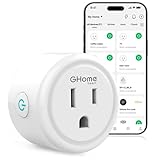
2. GHome Smart Plug: Best Budget
GHome Smart Plug
Low-cost plug that works with several popular apps
- Voice: Alexa and Google Assistant
- Apps: GHome, Smart Life, Tuya
- Setup: Bluetooth or Wi-Fi
- Hub: Not required
- Listing: ETL and FCC
Pros
- Works with Smart Life and Tuya ecosystems
- Random schedules for an away-from-home look
- Group control and sharing with family
Cons
- 2.4GHz Wi-Fi only
- Lesser-known brand than Kasa
The GHome plug is the value pick. It works with Alexa and Google Assistant, needs no hub, and is ETL and FCC listed. Setup can use Bluetooth or Wi-Fi, which helps the plug connect quickly to your 2.4GHz Wi-Fi network.
Its biggest strength is app flexibility. Besides the GHome app, it works with the Smart Life and Tuya apps, so if you already own other Tuya-based devices, you can keep everything in one place. Schedules can run on a cycle or at random, which is useful for making lights look lived-in while you travel.
You can also group several plugs and control them with one tap, and share access with family. The tradeoff is brand support. GHome is not as established as Kasa, so if long-term app updates matter to you, the EP10 is the safer pick.
3. Kasa Smart Plug HS103P4: Best Multi-Pack
Kasa HS103P4 4-Pack
Four trusted plugs to cover a whole room
- Pack: 4 plugs
- Rating: 15 Amp
- Voice: Alexa, Echo and Google Home
- Phones: Android 5.0+ and iOS 10.0+
- Safety: UL certified
Pros
- Four plugs for lamps, fans and holiday lights
- Same reliable Kasa app as the EP10
- Free app with timer and countdown schedules
Cons
- Needs 2.4GHz Wi-Fi
- Larger body than the Ultra Mini
If you want to automate several lamps or a whole room, the HS103P4 4-pack is the most efficient way to buy the best smart plugs in bulk. You get four Kasa plugs that work with Alexa, Echo and Google Home, with no hub needed and UL certification for safe use.
The Kasa app handles timers and countdown schedules, remote control from anywhere, and works with Android 5.0 or higher and iOS 10.0 or higher. The listing notes that Kasa was a PCMag Readers’ Choice in 2020, which reflects how long the platform has been around.
The HS103 is a standard-size plug rather than the Ultra Mini, so check how it fits on crowded outlets. If space is tight, consider the Kasa EP10 multi-packs instead. Otherwise, this is a simple way to set up four rooms in one go.
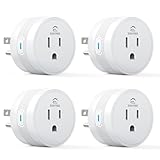
4. EIGHTREE 15A Smart Plug: Best for Higher-Power Appliances
EIGHTREE 15A Smart Plug
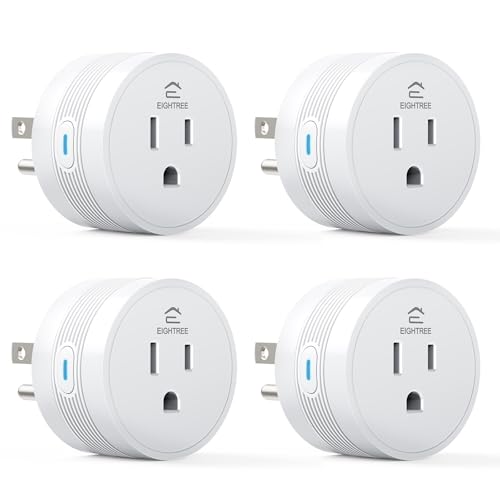
A compact 4-pack rated for 15A and 1800W
- Rating: 15A, 1800W
- Pack: 4 plugs
- Thickness: 1.2 inches
- App: Smart Life
- Listing: FCC and ETL
Pros
- Higher 1800W rating for appliances like coffee makers
- Compact round shape fits behind furniture
- Check device status remotely
Cons
- 2.4GHz Wi-Fi only
- Bluetooth must be on during setup
Most people use a smart outlet for lamps, but the EIGHTREE plug targets bigger loads. The listing rates it at 15A and 1800W and names coffee makers and air fryers among suitable appliances. That makes it a good choice for the kitchen.
The round body is only 1.2 inches thick, so it should fit behind furniture or in a crowded outlet. Setup uses the Smart Life app with Bluetooth turned on, then connects to your 2.4GHz Wi-Fi. You get remote control, device status and voice control through Alexa and Google Home.
One caution. The listing also mentions heaters, but many heater makers tell you to plug directly into the wall. Always follow the appliance manual, and never leave a high-power device running unattended through any smart outlet.
5. Govee Smart Plug 4-Pack: Best for Govee Homes

Govee Smart Plug 4-Pack
Group control alongside your Govee lights
- Rated: 10A, 1200W, 120V
- Pack: 4 plugs
- Connection: Bluetooth or Wi-Fi
- App: Govee Home
- Listing: ETL and FCC
Pros
- Bluetooth fallback alongside Wi-Fi
- One-button group control for multiple plugs
- Shares with family in the Govee app
Cons
- Lower power rating than the other picks
- Title says 15A, features say 10A
If you already have Govee lights, these plugs keep everything in the Govee Home app. They connect over Bluetooth or Wi-Fi, work with Alexa and Google Assistant, and support schedules plus a one-button group controller to switch all your plugs at once.
Read the power rating carefully. The listing title mentions 15A, but the feature list says the plug is rated 10A, 1200W at 120V. Go with the lower figure, and keep these on lamps, fans, chargers and other small loads.
The plugs are compact, ETL and FCC certified, and easy to share with family. Like the rest, they will not join 5GHz Wi-Fi. If you do not own other Govee gear, the Kasa plugs are a better all-round buy.
How to Choose the Best Smart Plug
Even the best smart plugs are simple devices, but a few details decide how happy you will be with them years from now.
Voice assistant support
All five plugs here work with Alexa and Google Home or Google Assistant. If you use Apple Home, check the listing carefully, because none of our picks mention it.
Wi-Fi band
Smart plugs almost always need 2.4GHz Wi-Fi. If your router combines bands under one name, setup can fail. Many routers let you split the bands temporarily. Our Wi-Fi 6 vs. 6E vs. 7 explainer covers how bands work, and our best mesh Wi-Fi systems guide helps if plugs keep dropping offline.
Power rating
Lamps and fans use little power, so any plug works. Kitchen appliances are different. For coffee makers or air fryers, look for a 15A or 1800W rating like the EIGHTREE. Treat the lower number as the real limit when a listing is inconsistent.
Safety certification
Look for UL or ETL marks. Kasa lists UL certification, while GHome, Govee and EIGHTREE list ETL and FCC. You can learn what UL certification means on the UL website.
Size and shape
Bulky plugs can block the second outlet. Mini designs like the Kasa EP10 and the round EIGHTREE save space.
App and ecosystem
The app is where you set schedules and groups. Kasa’s app is mature, GHome supports Smart Life and Tuya, and Govee ties in with Govee lights. Pick the one that matches devices you already own.
Smart Plug Ideas That Actually Save Effort
Not sure what to plug in? These are practical uses where a smart outlet earns its spot.
- Lamps on a schedule. Lights that turn on at sunset make an empty house look occupied.
- Fans and humidifiers. Start them before bed or switch them off with a countdown timer.
- Holiday lights. The Kasa and GHome listings both call out Christmas lights as a natural fit for schedules.
- Coffee makers. Use a 15A plug like the EIGHTREE, and only for simple machines with a physical on switch.
- Standby power. Switching off TVs and game consoles overnight can trim standby use. The ENERGY STAR site has more tips on cutting idle power.
Setup Tips and Common Mistakes
Most problems with the best smart plugs happen in the first ten minutes of setup. Here is how to avoid them.
- Connect to the 2.4GHz Wi-Fi band. If setup keeps failing, your phone may be on 5GHz. Move closer to the router or split the bands temporarily.
- Keep Bluetooth on during setup. The GHome, Govee and EIGHTREE plugs use Bluetooth to help pair.
- Do not overload a plug. Check the rating on each smart outlet, especially the Govee, which lists 10A and 1200W.
- Avoid power strips behind the plug. Plugging a loaded power strip into a smart outlet makes it easy to exceed the rating without noticing.
- Mix brands carefully. Several apps means several schedules to manage. Sticking to one ecosystem keeps routines simple.
Once the plugs are online, add them to Alexa or Google Home and create routines there. That way one voice command or schedule can control plugs from different brands together.
Smart Plug Safety and Load Limits
Smart plugs are simple, but they still sit between your wall and whatever you plug in, so a few safety checks matter more than app features. The most important number on any listing is the maximum current rating. Many of the best smart plugs are rated for 15 amps, while some compact models list a lower limit. Check the rating before you connect anything that heats up or runs a motor.
Match the plug to the appliance
Lamps, fans, holiday lights, chargers and coffee makers with a simple on and off switch are ideal. Space heaters, window air conditioners and other high-draw devices are a different story. Only use a smart outlet with them if the plug is clearly rated for that load, and never run more than one heavy appliance through the same plug with a power strip.
Look for a safety certification
A listing that mentions UL or ETL certification tells you the design was checked by an independent lab. Cheap no-name smart outlet models without any certification mark are not worth the small savings, especially for something that stays plugged in around the clock.
Remember the manual switch still matters
The appliance has to be left in its “on” position for the smart outlet to control it. Devices with a soft-touch power button or a digital control panel often wake up in standby when power returns, so a smart outlet cannot turn them fully on. Test this once before you build a schedule around it.
Use energy monitoring if you have it
Some of the best smart plugs report power use in the app. That makes it easy to spot gear that draws power in standby, like older TVs, game consoles and speakers. Even if you never automate anything, a week of readings from a smart outlet can show you which devices are worth switching off overnight.
Frequently Asked Questions
Which are the best smart plugs for Alexa?
All five plugs here work with Alexa. The Kasa EP10 is our top pick, the GHome plug is the budget option, and the Kasa HS103P4 4-pack is best for multiple rooms.
Do smart plugs need a hub?
No. Every plug in this guide connects directly to your 2.4GHz Wi-Fi network and states that no hub is required.
Can a smart plug work with 5GHz Wi-Fi?
None of our picks support 5GHz. Most routers broadcast both bands, so you can usually connect the plug to the 2.4GHz band without changing anything else.
Can I use a smart plug with a space heater?
Some listings suggest it, but many heater makers recommend plugging directly into the wall. Follow the heater manual, and never exceed the plug’s rating.
How many of the best smart plugs should I buy?
Start with one or two to learn the app, then buy a multi-pack once you know where they help most. Four plugs typically cover a living room and bedroom, so a 4-pack like the Kasa HS103P4 is good value once you are sure.
Do these smart plugs track energy use?
None of the listings for our picks mention energy monitoring. If tracking power use is important, look specifically for a plug that lists it.
The bottom line
The best smart plugs are cheap, simple and surprisingly useful. The Kasa Ultra Mini EP10 is our pick for most homes thanks to its compact size, UL certification and mature app. The GHome plug saves money, and the Kasa HS103P4 4-pack is the easy way to automate several rooms at once.
Check Kasa Ultra Mini EP10 price

