
Best LED Video Lights (2026): 5 Brilliant Picks for Streaming and Video
Five LED video lights for desks, cameras and home studios, with simple setups that make any webcam or camera look better.
We earn a commission if you buy through our links, at no extra cost to you. As an Amazon Associate, we earn from qualifying purchases. How we make money.

The best LED video lights do more for your picture than a new camera ever will. Good light makes a cheap webcam look sharp, evens out skin tones and kills the harsh shadows from a ceiling bulb or a window behind you.
To find the best LED video lights, we compared specs, listings and owner feedback for the most popular options on Amazon. The five picks below cover a desktop panel with a battery, a budget RGB two-pack, a pocket light for camera rigs, a monitor-mounted light for calls and a two-light studio kit with stands.
The best LED video light for most people is the NEEWER NL-116AI because it pairs CRI 95+ color with 3200K-5600K control, a built-in 4000mAh battery and a cold shoe adapter for your camera. If you want two lights with color effects for the least money, get the Amazon Basics 2-Pack RGB LED Video Light.
Best LED Video Lights at a Glance

- CRI 95+ bi-color panel
- Built-in 4000mAh battery
- Desk tripod and cold shoe adapter
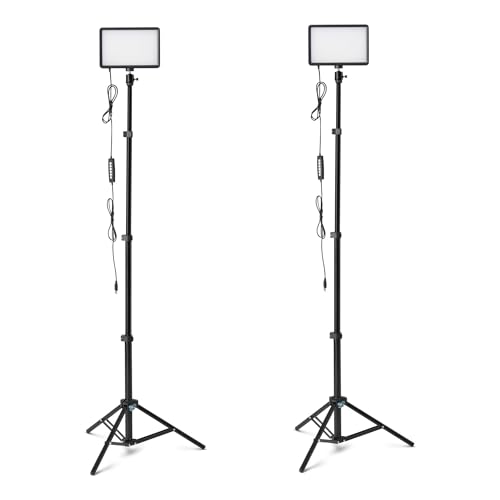
- Two lights with 62.3 in tripods
- 7 RGB colors plus 2500-6500K
- USB powered

- CRI 96 and TLCI 99
- 2500K-10000K plus RGB
- Pocket size with 4800mAh battery
| Product | Price | ||
|---|---|---|---|
 | Best Overall NEEWER NL-116AI | $49.99Price as of Nov 3, 2026 2:02 pm EST ⓘ | Check Price |
 | Best Budget Amazon Basics RGB 2-Pack | $34.99Price as of Nov 3, 2026 2:18 pm EST ⓘ | Check Price |
 | Premium Pick SmallRig RM 40C | $79.99Price as of Nov 3, 2026 2:18 pm EST ⓘ | Check Price |
 | Best for Video Calls Logitech Litra Glow | $59.99 | Check Price |
 | Best Two-Light Kit NiceVeedi 2-Pack Kit | $45.59 | Check Price |
1. NEEWER NL-116AI: Best for Desk and Camera Use
NEEWER NL-116AI 9 in LED Panel
Bi-color key light that runs on battery or USB
- Output: 10W max 600 lux at 0.5 m
- Color: 3200K-5600K CRI 95+
- Battery: 4000mAh up to 1.5 h
- Charging: USB-C and Micro USB
- Mounts: Desk tripod and cold shoe adapter
Pros
- Precise 1% knob control
- Works off the desk or on a camera
- All-metal mini tripod
Cons
- No RGB colors
- Carry bag not included
This 9-inch panel is the light we would buy first, and it tops our list of the best LED video lights. It uses 58 warm and 58 cool LEDs for 3200K to 5600K color, with CRI 95+ for accurate skin tones. NEEWER lists 10W max output and 600 lux at half a meter, which is enough to work as a main key light at a desk.
What makes it flexible is power and mounting. A built-in 4000mAh battery runs up to 1.5 hours and recharges in about 2 hours over USB-C or Micro USB. The kit includes an all-metal tabletop stand that extends to 8.6 inches and a cold shoe adapter, so you can move it from the desk to the top of a mirrorless camera in seconds. Two knobs set brightness and color in 1% steps.
The tradeoffs are small. There are no RGB effects, and the carry bag is not included. If you want colored background accents for streaming, add a cheap RGB light alongside it.
2. Amazon Basics 2-Pack RGB LED Video Light: Best Budget Kit
Amazon Basics 2-Pack RGB LED Video Light
Two slim panels with color effects and tall tripods
- Lights: 2 panels
- Color: 2500-6500K plus 7 RGB colors
- Dimming: 0-100%
- Stands: 62.3 in adjustable tripods
- Power: USB 5V 2A
Pros
- Two lights for the price of one
- RGB for background accents
- Ball head and 360° gimbal
Cons
- Power adapter not included
- No battery listed
If you want a key light and a fill light without a big spend, this two-pack is the easy answer. Each slim panel offers three color temperature presets from 2500K to 6500K and seven RGB colors, with brightness from 0% to 100%.
The lights come on 62.3-inch adjustable tripods with a 1/4-inch ball head and 360° gimbal for aiming. Power runs over USB at 5V/2A from a wall plug, power bank, computer or car charger. That makes it easy to set up at a desk, a makeup station or a small video corner.
You will need your own USB power adapters, and the listing does not mention a battery or a CRI rating. If color accuracy for product photos matters, choose the NEEWER or SmallRig instead. For streaming and calls, it is excellent value.
3. SmallRig RM 40C: Best Pocket RGB Light
SmallRig RM 40C RGB LED Light
Pocket-size pro color for camera rigs
- Color: 2500K-10000K plus 36000+ colors
- Accuracy: CRI 96 TLCI 99
- Brightness: Up to 4670 lux at 0.5 m boost
- Battery: 4800mAh 55 min at full
- Size: 5 x 3.1 x 1.2 in 10.6 oz
Pros
- Best color accuracy listed here
- 14 lighting effects
- Magnetic diffuser included
Cons
- Short runtime at full power
- Overkill for simple video calls
The RM 40C is the light for creators who shoot on location, and the most capable of the best LED video lights here for its size. It measures 5 x 3.1 x 1.2 inches and weighs 10.6 ounces, with an anti-twist 1/4-inch-20 thread to mount on a camera or cage. SmallRig lists 145 LEDs with CRI 96 or higher and TLCI 99 or higher, the best accuracy figures on our list.
Color range is wide. You get 2500K to 10000K white light, more than 36,000 colors and 14 cinematic effects. SmallRig rates it at 40W with up to 4670 lux at 0.5 m in Boost Mode. An LCD screen and precision knob handle settings, and a magnetic diffuser snaps on to soften faces.
The 4800mAh battery lasts 55 minutes at full brightness, so plan to run it lower or keep a USB-C PD charger close. It can run while charging. Skip it if you only need a light for meetings, where the Litra Glow is simpler.
4. Logitech Litra Glow: Best for Video Calls

Logitech Litra Glow
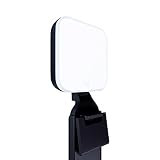
Monitor-mounted light for meetings and streams
- Light: TrueSoft full-spectrum LED
- Diffuser: Frameless wide soft light
- Mount: 3-way monitor mount
- Control: Desktop app for PC and Mac
- Safety: Cleared UL testing for all-day streaming
Pros
- Clips to your monitor
- Soft flattering light
- App control from your computer
Cons
- Not for camera mounting
- Less flexible than a panel on a stand
Most people who search for a video light really want to look better on Zoom. The Litra Glow is built for exactly that. It mounts on your monitor with a 3-way mount that adjusts height, tilt and rotation, so it sits right above your webcam.
Logitech’s TrueSoft technology aims for balanced, full-spectrum light and natural skin tones. A frameless diffuser spreads wide, soft light that reduces harsh shadows. You can adjust brightness and color temperature from warm to cool, and the desktop app works on both PC and Mac. The listing also says it cleared strict UL testing for all-day streaming.
It is a one-job light. It will not sit on a camera, and it cannot act as a background or hair light. If that is all you need, it is the cleanest desk setup here. Pair it with one of our best 4K webcams for a sharp, well-lit picture.
5. NiceVeedi 2-Pack LED Video Light Kit: Best Two-Light Studio Kit

NiceVeedi 2-Pack LED Video Light Kit
Two larger panels with stands and a remote
- Lights: 2 panels 10 x 7.8 in
- Output: 15W 356 LED beads
- Color: 2800K 4800K 6500K CRI 97+
- Dimming: 10-100% by remote
- Power: USB 5V 2A
Pros
- Large soft panels
- High CRI 97+ rating
- Storage bag included
Cons
- Wall charger not included
- Only three color presets
For a small home studio, bigger panels give softer light. Each NiceVeedi panel measures 10 x 7.8 inches with 356 LED beads and 15W output. The thick shell acts as a diffuser, and NiceVeedi lists a CRI of 97+.
You get three color temperature presets (2800K, 4800K and 6500K) and brightness from 10% to 100% using a remote. Each panel mounts on an adjustable aluminum stand that folds to 17 inches, and the panel rotates through 180°. A storage bag and USB-C adapters are included.
Power runs over USB from a 5V/2A charger or power bank, which you supply. The title and bullet points list different stand heights, so check the listing if height matters. Skip it if you need fine color control rather than presets.

How to Choose the Best LED Video Light
The best LED video lights differ mainly in color accuracy, size, power and how they mount. Here is what to weigh.
Color accuracy (CRI and TLCI)
CRI and TLCI describe how faithfully a light shows real colors. Look for CRI 95 or higher if skin tones or products matter. The SmallRig, NiceVeedi and NEEWER all list ratings in that range.
Color temperature range
Color temperature runs from warm (lower K) to cool (higher K). Matching your light to the room, such as daylight from a window, avoids odd color casts. Bi-color lights cover the essentials. RGB adds creative accents.
Panel size and softness
Bigger panels and diffusers create softer, more flattering light. Pocket lights are brighter for their size but harsher unless you diffuse them.
Battery or USB power
Battery lights travel and mount on cameras. USB-only lights are fine at a desk but need a power source nearby. Check whether an adapter is included, since several of these kits leave it out.
Mounting options
Decide where the light lives. Monitor mounts suit calls, desk tripods suit streaming, tall stands suit full-body video, and cold shoe or 1/4-inch threads suit cameras.

Simple Lighting Setups That Work
You do not need a studio to get great results from the best LED video lights. Start with one key light and add more only when you see a problem.
| Setup | Lights | Where to place them | Good fit |
|---|---|---|---|
| Video calls | 1 | Above or just behind the webcam | Litra Glow |
| Streaming | 2 | Key at 45° to one side, fill on the other at lower power | NEEWER NL-116AI plus Amazon Basics |
| Podcast or YouTube | 2 to 3 | Key and fill, plus a colored light on the background | NiceVeedi kit plus RGB accent |
| On location | 1 | On the camera with diffuser | SmallRig RM 40C |
Common Lighting Mistakes to Avoid
Even the best LED video lights look bad when they are placed badly. These are the errors that show up most often in home setups, and each one takes a minute to fix.
- Light straight on at eye level. It flattens your face. Raise the light slightly above your eyes and angle it in from one side.
- Running at 100% all the time. Full power creates glare on glasses and hot spots on skin. Start around half brightness and adjust from there.
- Mixing warm and cool sources. A cool panel next to a warm desk lamp gives a two-tone face. Turn off the lamp or match the light to it.
- Forgetting the background. A dark room behind you makes the camera boost noise. A small RGB light on the wall adds depth and keeps the image clean.
- Buying too much too soon. Three lights you never adjust do less than one light placed well.
If you are on a tight budget, start with one of the best LED video lights from our list and a window. Add a second light only once you can see where the shadows fall.

Getting Your Camera and Lights to Agree
Even the best LED video lights can look off if your camera keeps guessing. Most webcams and phones adjust white balance and exposure on their own, and they shift every time you move or a cloud passes the window. A few settings stop that.
Lock white balance
Set your light to one color temperature, then set your camera or webcam app to the same value. If your app only has auto white balance, lock it once the image looks right. Skin tones then stay consistent from the start of a call to the end.
Lower or lock exposure
With a key light on your face, the camera no longer has to brighten the whole frame. Lowering exposure a step or locking it reduces grain and stops a bright window behind you from swinging the image darker and lighter.
Watch for flicker
Faint rolling bands on screen usually mean your camera and the lights in the room are out of sync. Set the anti-flicker option in your camera or app to your local power frequency (60 Hz in the US, 50 Hz in the UK). If the bands only appear at very low brightness, raise the light a few steps.
Change one setting at a time and check a test recording. Five minutes of tuning makes a bigger difference than a second light.
Frequently Asked Questions
What are the best LED video lights for streaming?
The NEEWER NL-116AI makes a strong key light, and the Amazon Basics RGB 2-Pack adds fill and color accents cheaply. If you only take calls, the Logitech Litra Glow is the tidiest choice.
How many lights do I need?
One main light fixes most problems. Add a second at lower power on the other side to soften shadows. A third light behind you separates you from the background.
What color temperature should I use?
Match the room. Around 5600K suits daylight, and warmer settings near 3200K suit indoor bulbs. Mixing very different temperatures on your face looks unnatural.
Do I need a battery-powered light?
Only if you shoot away from a desk. The NEEWER NL-116AI and SmallRig RM 40C both have built-in batteries. You can find more of NEEWER’s lineup on NEEWER’s website.
Is a ring light better than a panel?
Ring lights give an even, front-on look that suits makeup and selfies. Panels are more flexible because you can place them at an angle for shape and depth.
The bottom line
The best LED video lights give you accurate color and easy control. The NEEWER NL-116AI is the best all-rounder, the Amazon Basics RGB 2-Pack is the budget kit, and the SmallRig RM 40C is the premium pocket light. Choose the Litra Glow if you only need to look good on calls.
Check NEEWER NL-116AI price

