
Best USB-C Chargers (2026): 5 Smart Picks for Every Device
Five GaN wall chargers from Anker, UGREEN and wegear, compared by wattage, ports and size, with clear advice on who should skip each one.
We earn a commission if you buy through our links, at no extra cost to you. As an Amazon Associate, we earn from qualifying purchases. How we make money.

The best USB-C chargers are small enough to live in a bag, powerful enough for a laptop, and smart enough to split power between a phone, a tablet and earbuds without fuss. Most people still carry two or three bricks when one well-chosen charger would do the job.
We compared specs, listings and owner feedback for the best USB-C chargers on Amazon, from a tiny 30W cube to a 160W desk station. Below you will find five picks, what each listing actually promises, and who should skip each one.
The best USB-C charger for most people is the Anker 735 (Nano II 65W) because it charges a phone, a tablet and a 13-inch laptop from three ports in a body roughly the size of an AirPods Pro case. If you only charge a phone and earbuds, get the UGREEN 30W 3-Port.
Best USB-C Chargers at a Glance

- 65W max from one port
- Three ports for phone, tablet and laptop
- Foldable plug, 18-month warranty

- 2 USB-C and 1 USB-A
- GaN II chip with temperature detection
- Supports PD, QC and PPS

- 160W total output
- Up to 140W from one USB-C port
- Rotatable touch display
| Product | Price | ||
|---|---|---|---|
 | Best Overall Anker 735 Nano II 65W | $29.99Price as of Nov 3, 2026 2:02 pm EST ⓘ | Check Price |
 | Best Budget UGREEN 30W 3-Port | $9.94 | Check Price |
 | Premium Pick UGREEN Nexode Pro 160W | $64.99 | Check Price |
 | Best Smart Display Anker 100W Smart Display | $59.99 | Check Price |
 | Best 100W Value wegear 100W 3-Port | $39.99Price as of Nov 3, 2026 2:18 pm EST ⓘ | Check Price |
1. Anker 735 Nano II 65W: Best Overall
Anker 735 Charger (Nano II 65W)
Three ports and laptop-level power in a pocket-sized brick
- Max output: 65W single device
- Ports: 3
- Chip: GaN II
- Plug: Foldable
- Warranty: 18 months
Pros
- Enough for a 13-inch MacBook Pro at full speed
- Shares power across three devices
- Roughly AirPods Pro case size
Cons
- 65W is split when all three ports are busy
- Listing does not detail per-port output
The Anker 735 is the charger we would hand to almost anyone. Anker says a single device gets up to 65W, which the listing states is enough to run a 2020 13-inch MacBook Pro at full speed. Plug in three devices and the power is shared between the ports.
What makes it a strong all-rounder is the size. Anker compares it to an AirPods Pro case, and the foldable plug means nothing pokes holes in your bag. The GaN II design is the reason it stays that small, and the 18-month warranty is a nice safety net for a product you will drag everywhere.
The tradeoff is headroom. If you own a 14-inch or 16-inch performance laptop, 65W can feel slow, and once a phone and tablet join the laptop, each device gets less. Skip it if you need to fast charge a big laptop and a phone at the same moment.
2. UGREEN 30W 3-Port: Best Budget
UGREEN 30W 3-Port GaN II Charger
A cheap, compact cube for phones, earbuds and tablets
- Max output: 30W
- Ports: 2 USB-C, 1 USB-A
- Chip: GaN II
- Protocols: PD, QC, PPS
- Shared output: Up to 15W per port
Pros
- Three ports in a tiny body
- Always-on temperature detection
- Flame-retardant matte PC housing
Cons
- Drops to 15W per port when several ports are used
- Not meant for laptops beyond very light charging
If you mainly charge a phone, this UGREEN cube is the smart budget buy. It is a solid USB-C charger for iPhone owners: UGREEN says it can bring an iPhone 17 or Galaxy S26 to about 60% in 30 minutes. You also get two USB-C ports and one USB-A port, so an older cable or a pair of earbuds still has a home.
The listing highlights an upgraded GaN II chip, protection against over-voltage, over-current and short circuits, and support for PD, QC and PPS fast charging. That spread of protocols matters if your household mixes iPhones and Samsung phones.
Read the fine print, though. UGREEN notes that when you use multiple ports at once, each port tops out at 15W, and it recommends using a single port for original MagSafe accessories. Skip it if you want one brick for your laptop too.
3. UGREEN Nexode Pro 160W: Best for Power Users
UGREEN Nexode Pro 160W
A five-port desk station that can feed a 16-inch laptop
- Total output: 160W
- Single port: Up to 140W on C1 and C2
- Ports: 4 USB-C, 1 USB-A
- Display: Rotatable touch screen
- Plug: Foldable US plug
Pros
- Enough power for large laptops
- Shows per-port wattage, protocol and temperature
- Replaces several bricks
Cons
- Overkill if you only charge phones
- US plug listing, so UK buyers should check the local version
This is the GaN charger to buy if your laptop is the hungriest thing you own. UGREEN rates it at 160W total, with up to 140W from either of the first two USB-C ports. The listing claims it can bring a 16-inch MacBook Pro with M4 Max to 56% in 30 minutes.
The rotating touch display is more useful than it sounds. It shows total wattage, per-port power, the active charging protocol and internal temperature, so you can see right away whether a cable is holding your laptop back. With four USB-C ports and one USB-A port, it can replace most of the bricks on a crowded desk.
It is a premium buy and a bigger object than the rest of this list. If you only carry a phone and a tablet, you are paying for power you will never use. UGREEN lists a foldable US plug, so readers in the UK should look for the UK version.
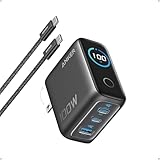
4. Anker 100W Smart Display: Best for Travel With a Laptop
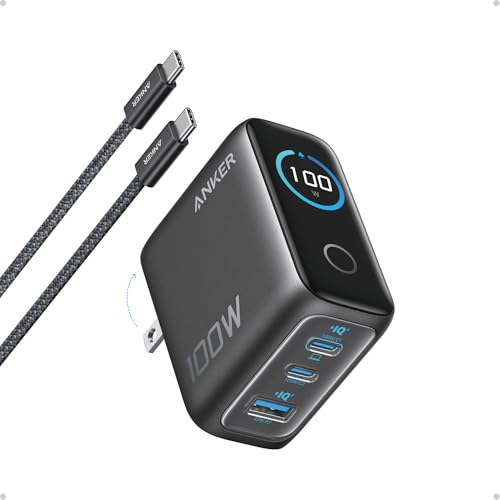
Anker 100W 3-Port Smart Display Charger
100W from any USB-C port, with a cable in the box
- Max output: 100W on any USB-C port
- Ports: 3
- Size: 2.72 x 2.17 x 1.34 in
- In the box: 4.9 ft USB-C to USB-C cable
- Warranty: 18 months
Pros
- Full 100W on any USB-C port
- Low-current mode for earbuds
- Cable included
Cons
- Fewer ports than the UGREEN 160W
- Pricier than basic 100W bricks
Anker squeezes 100W into a frame that measures 2.72 x 2.17 x 1.34 inches, with a foldable plug. The listing says any USB-C port can deliver the full 100W, so you never have to remember which port is the fast one.
Two details stand out. First, the high-definition display shows charging status, temperature and port performance. Second, a low-current mode kicks in on the second USB-C port or the USB-A port when output stays at or below 5W for a minute, which Anker says helps with earbuds and other low-power gear. You also get a 4.9 ft USB-C cable, so it doubles as a USB-C charger for iPhone and MacBook straight out of the box.
Who should skip it? If you need four or five devices running at once, the UGREEN 160W makes more sense. If you do not care about a screen, the wegear below gives you 100W for less.
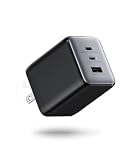
5. wegear 100W 3-Port: Best 100W Value

wegear 100W 3-Port GaN Charger
No-frills 100W with safety certifications
- Max output: 100W single device
- USB-C: 2 ports, 100W PD
- USB-A: 1 port, 22.5W QC
- Chip: GaN III
- Certifications: ETL, CSA, UL
Pros
- 100W for a 14-inch MacBook Pro class laptop
- ETL, CSA and UL certified
- Foldable plug
Cons
- USB-C cable not included
- Less familiar brand than Anker or UGREEN
The wegear is the plain, practical way to get 100W. It has two USB-C ports rated for 100W PD and one USB-A port rated for 22.5W QC. A single device can take the full 100W, which wegear says is enough to bring a 14-inch MacBook Pro (M3 Pro) to 50% in 30 minutes.
The listing leans on safety. It uses a GaN III chip, claims to run 40% cooler than traditional 100W silicon chargers, and is listed as ETL, CSA and UL certified with short-circuit and overload shutdown. Those certifications are a good sign for a less famous brand.
Budget for a cable. wegear states that no USB-C cable is included, and a 100W charger needs a cable rated for 100W to reach full speed. Skip it if you would rather pay a little more for Anker’s warranty and display.
How to Choose the Best USB-C Chargers for Your Devices
The best USB-C chargers all share a few traits, but the right one for you depends on what you plug in every day. Start with your most power-hungry device and work down.
Match the wattage to your biggest device
Phones need far less power than laptops. A 30W charger covers most phones and small tablets. Thin laptops are happy around 65W, while larger performance laptops benefit from 100W or more. Buying more wattage than you need is safe, because the device only draws what it can use.
Check how power is shared across ports
The headline number is usually the maximum from one port, or the total across all ports. Once you plug in a second device, the charger splits its budget. The UGREEN 30W, for example, drops to 15W per port when several are in use. Read the listing for that detail before you buy.
Pick a GaN charger for size
GaN (gallium nitride) parts let manufacturers build smaller chargers that run cooler at the same power. Every pick on this list is a GaN charger. Anker’s 65W model is roughly AirPods Pro case size, which would have been impossible with older silicon designs.
Look for the right charging standards
USB Power Delivery (PD) is the standard iPhones, iPads and MacBooks use. PPS matters for Samsung’s faster charging modes, and QC is common on older Android phones. The USB Implementers Forum maintains the USB-C and Power Delivery specs if you want the technical background.
Think about the plug and where you travel
A foldable plug protects your bag and the prongs. US and UK listings often sell different plug versions of the same charger, so check before you order. If you travel across regions often, a charger with swappable plugs or a universal travel adapter saves headaches.
Do not forget the cable
A 100W charger paired with a 60W cable is a 60W charger. Only the Anker 100W on this list includes a cable. If you are confused by cable labels, our guide to USB-C vs Thunderbolt vs USB4 explains what the logos mean.
How Much Wattage Do You Actually Need?
The best USB-C chargers are the ones sized to your gear, not the ones with the biggest number on the box. Use this table as a starting point. It is based on how the charger listings above describe their own use cases, not on lab measurements.
| What you charge | Suggested wattage | Pick from this list |
|---|---|---|
| Phone and earbuds | 30W | UGREEN 30W 3-Port |
| Phone, tablet, thin laptop | 65W | Anker 735 Nano II 65W |
| 14-inch laptop plus phone | 100W | Anker 100W or wegear 100W |
| 16-inch laptop and a full desk | 140W to 160W | UGREEN Nexode Pro 160W |
If you own an iPhone and nothing else, a 30W USB-C charger for iPhone use is plenty. Anything above that only pays off once a laptop or a second big device enters the picture.
Common Charger Buying Mistakes
Even the best USB-C chargers disappoint when they are paired with the wrong setup. These are the mistakes we see most often in owner feedback.
- Trusting the total wattage alone. A 65W six-port brick might only give 30W to a single USB-C port. Check single-port output.
- Ignoring the cable. Your charging speed is capped by the weakest part of the chain.
- Buying the wrong plug. US and UK versions are separate listings. Confirm before checkout.
- Overbuying. A 160W charger for a phone-only setup is money spent on unused capacity.
- Skipping safety details. Look for over-voltage, over-current and short-circuit protection, which every pick here lists.
Chargers also pair well with portable power. If you spend long days away from an outlet, our list of the best power banks for iPhone covers the other half of the setup.
Charger Safety and Cable Tips
Even the best usb-c chargers depend on the cable you pair them with. A few simple habits keep any gan charger running fast and safe.
Match the cable to the wattage
Most USB-C cables are rated for 60W. To get more than that from a gan charger, such as 100W for a larger laptop, you need a cable rated for 100W or higher (often listed as 5A). With a lower-rated cable, the charger simply delivers less power.
Expect some warmth
A compact gan charger gets warm under a full load, which is normal. Leave it where air can reach it, not under a pillow or a pile of clothes.
Stick with known brands
Look for a listing that mentions safety certification, and avoid an unbranded gan charger that promises huge wattage in a tiny body. For a usb-c charger for iphone, a 20W or higher USB-C PD model is enough for fast charging, and any of the best usb-c chargers above clears that bar.
Frequently Asked Questions
What are the best USB-C chargers for an iPhone?
For a phone-only setup, the UGREEN 30W 3-Port is the simplest USB-C charger for iPhone owners, since UGREEN says it reaches about 60% on an iPhone 17 in 30 minutes. If you also carry a laptop, the Anker 735 covers both. Among the best USB-C chargers here, either is a safe choice.
Is a GaN charger safe to leave plugged in?
Every GaN charger on this list advertises protection against over-voltage, over-current and short circuits, and several mention temperature monitoring. As with any charger, keep it ventilated and unplug anything that is damaged.
Can a laptop charger damage my phone?
No. USB-C chargers negotiate power with the device, so your phone only takes what it supports. A 100W charger will not push 100W into a phone, so any laptop brick here is also a safe USB-C charger for iPhone use.
Why does my charger slow down when I add a second device?
Multi-port chargers share a fixed total. When you add a device, the charger splits that total between ports. The Anker 735 and wegear 100W both describe this power sharing in their listings.
Do I need a special cable for 100W charging?
Yes. You need a USB-C cable rated for at least 100W. Many cheap cables are rated for 60W, which limits your laptop’s charging speed even on the best USB-C chargers.
The bottom line
The Anker 735 Nano II 65W is our top pick among the best USB-C chargers because it handles a phone, tablet and thin laptop from one small, foldable brick. Go with the UGREEN 30W if you only charge a phone, or the UGREEN Nexode Pro 160W if a big laptop sits at the center of your desk.
Check Anker 735 price

